


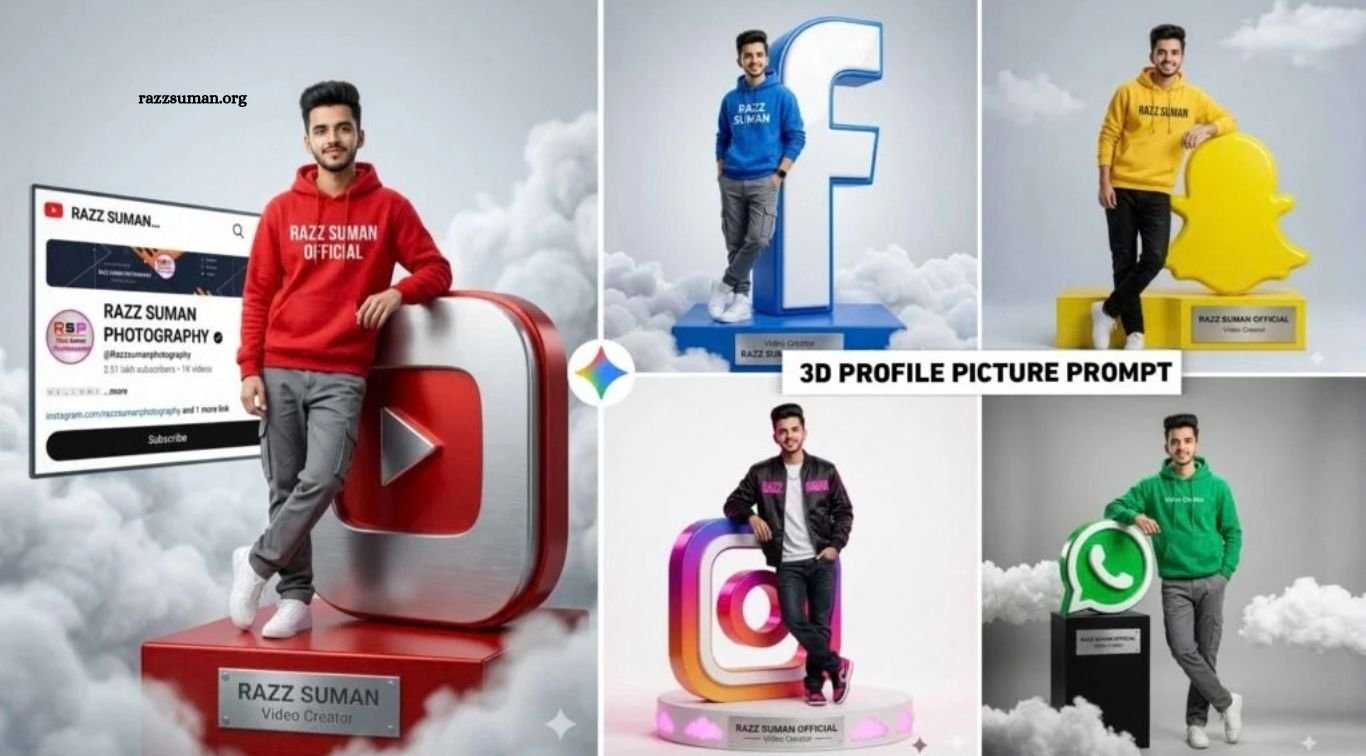
3D profile picture AI prompts have become a popular trend on social media, allowing users to create eye-catching profile images featuring their names, photos, and platform logos. Similar designs first gained attention through tools like Bing Image Creator, especially for Facebook, Instagram, and YouTube-themed 3D profile pictures.
Now, updated 3D social media AI photo styles are trending again with more realistic and creative results. In this article, we will share useful prompts that can help you create similar 3D profile pictures using Gemini and ChatGPT with ease.
Read More: ChatGPT iPhone Look Photo Editing Prompt | iPhone Photo Editing
Breakdown of 3D Profile Picture AI Photo Prompts
Earlier, 3D profile picture trends mainly focused on creating stylish images featuring a user’s name. With Gemini, the trend has evolved, and users can now create more personalized AI photos by combining their face with screenshots of their social media profiles. These designs look more realistic, attractive, and suitable for platforms such as Instagram, Facebook, WhatsApp, and others.
To create a similar 3D profile picture, start with a clear, high-quality selfie and a screenshot of the social media profile you want to feature. Upload both images to Gemini, then use the relevant prompt provided in this article. The same method can be used for different platforms, allowing you to create customized 3D social media profile pictures with your own photo and profile details.
Can I Create All Types of Photos With a Single Prompt?
Yes, you can create different types of 3D social media profile pictures using a single prompt, but you may need to customize a few details. For example, if the original prompt is designed for Instagram and you want a YouTube version, simply replace “Instagram” with “YouTube.” You can also adjust the background color, platform name, design style, and other elements according to your preference.
If the edited prompt does not produce the desired result, you can further refine it with ChatGPT. The reason different prompts are provided in this article is to make the process easier for users. Instead of editing everything manually, you can simply choose the prompt that matches the style you want, copy it, and create your preferred 3D social media profile picture.
3D Profile Picture AI Prompts

A hyper-realistic 8K studio photo ( 3:4 )shot of a young man (use the exact face from the uploaded reference image, keep 100% same facial features, eyes, and hair without any changes) wearing a vibrant red hoodie with “RAZZ SUMAN OFFICIAL” printed in clean white capital letters, grey cargo pants and white sneakers, leaning casually against a large 3D YouTube logo, standing on a red pedestal with a silver plaque engraved “RAZZ SUMAN” and “Video Creator,” surrounded by soft white clouds, with a floating screen displaying the exact uploaded YouTube profile screenshot (unaltered) integrated naturally into the scene, cinematic lighting, ultra-realistic details, light grey gradient background.

A hyper-realistic 8K studio shot (50mm, slightly low angle) of a person (use exact face from uploaded reference image, keep 100% same facial features unchanged) smiling and leaning against a large glossy blue Facebook ‘f’ logo, wearing a blue hoodie with “RAZZ SUMAN”, grey cargo pants, white sneakers, and a smartwatch, standing on a blue plinth with soft clouds and a metallic plaque reading “RAZZ SUMAN OFFICIAL” and “Video Creator,” cinematic lighting, ultra-detailed textures, light grey gradient background.
Google Gemini Photo Prompts

Ultra-realistic 8K full-body studio shot (50mm, slightly low angle) of a person (use exact face from uploaded reference image, keep 100% same facial features unchanged) smiling confidently, left hand in pocket and right arm leaning on a large glossy blue Facebook ‘f’ logo, wearing a blue hoodie with “RAZZ SUMAN”, grey cargo pants, white sneakers, and a smartwatch, standing on a blue plinth with soft clouds and a metallic plaque reading “RAZZ SUMAN OFFICIAL” and “Video Creator,” cinematic lighting, ultra-detailed textures, light grey gradient background.

Ultra-realistic 8K full-body studio shot of a person (use exact face from uploaded reference image, keep 100% same facial features unchanged) smiling confidently, wearing a green hoodie with “Video Creator”, grey cargo pants and white sneakers, leaning on a large glossy WhatsApp logo (left arm on it, right hand in pocket, legs crossed), standing on a black pedestal with soft clouds and a plaque reading “RAZZ SUMAN OFFICIAL” and “Video Creator,” cinematic lighting, ultra-detailed textures, light grey background.
How to Create a 3D Profile Picture AI Using Gemini
Before creating your 3D profile picture, prepare two important images. First, take a clear screenshot of the social media profile you want to include in the design. It is better to use a light-theme screenshot, as it usually gives cleaner results. Second, keep a high-quality photo of yourself ready with your face clearly visible. Avoid masks, hats, sunglasses, or anything that may cover facial features, as this can affect the accuracy of the generated image.
Once both images are ready, follow these steps to create your 3D profile picture with Gemini:
- Open Google Gemini.
- Select the Create Image option.
- Click the media or upload option.
- Upload your profile screenshot and personal photo.
- Copy and paste the required AI prompt into the chat box.
- Click the send button to generate the image.
- Review the generated 3D profile picture carefully.
- Open the image in full view and save it to your device.
You can repeat the same process with different social media screenshots and customized prompts to create unique profile pictures for Instagram, Facebook, YouTube, WhatsApp, and other platforms.
Frequently Asked Questions
What are Gemini 3D AI prompts?
They are text instructions used to create 3D-style profile pictures with Gemini AI.
Can Gemini create social media profile pictures?
Yes, Gemini can generate creative profile images using photos, screenshots, and detailed prompts.
Which social media platforms can I use these prompts for?
You can create designs for Instagram, Facebook, YouTube, WhatsApp, TikTok, and other platforms.
Do I need a clear photo for better results?
Yes, a high-quality photo with a clearly visible face usually produces better AI results.
Can I customize Gemini 3D AI prompts?
Yes, you can change platform names, colors, backgrounds, text, and design styles.
Can I use one prompt for different profile pictures?
Yes, simply edit the platform name and other details to create different versions.
Conclusion
Gemini 3D AI prompts make it easy to create stylish and personalized social media profile pictures with a modern 3D look. By using a clear photo, a profile screenshot, and the right prompt, you can generate attractive designs for Instagram, Facebook, YouTube, WhatsApp, and other platforms. You can also customize each prompt by changing colors, platform names, backgrounds, and visual styles. With a little creativity and prompt editing, Gemini can help you produce unique profile pictures that stand out across social media.

1 Comment
Pingback: Boy, Girl & Couple AI Photo Editing Prompts for Google Gemini - razzsuman.org