


A few years ago, creating a sad or heartbreak-themed photo required hours of manual editing. Users had to work with tools like PicsArt or Snapseed, search for suitable backgrounds, images, PNG elements, tears, and other effects, then carefully adjust colors, lighting, shadows, and composition to achieve a realistic result.
Today, AI has made this process much faster and easier. With the right Heartbreak AI Photo Prompts, you can create emotional, cinematic, and realistic images within minutes without complex editing skills. These AI-generated heartbreak photos are also becoming increasingly popular for sharing emotional moments and creative edits on social media.
Read More: Raksha Bandhan AI Photo Editing Prompt 2026 | Best Rakhi AI Prompts
Full Details About the Heartbreak AI Photo
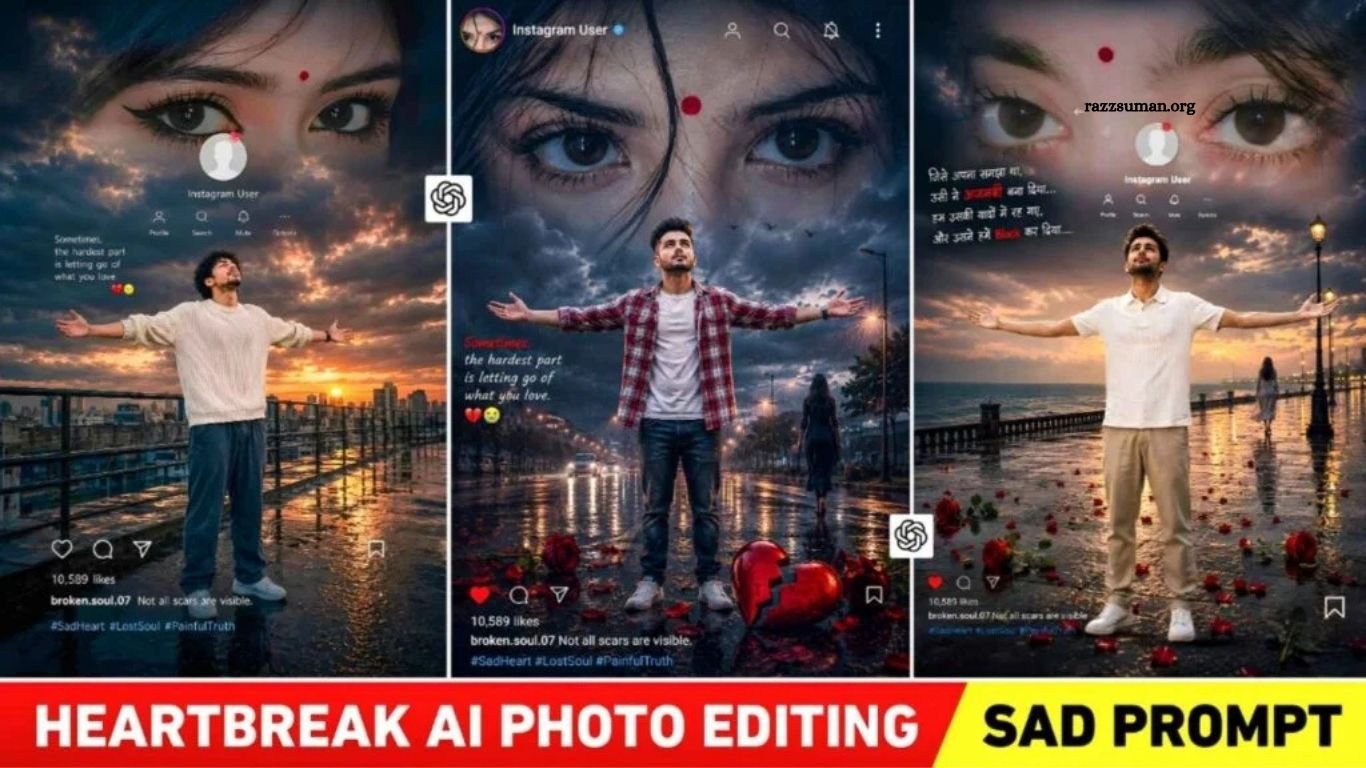
The Heartbreak AI Photo stands out with its cinematic, dark, and emotional atmosphere. The boy remains the main focus, while his facial expressions and body language reflect loneliness, sadness, and the pain of a broken relationship. Soft lighting, blurred backgrounds, shadows, and cinematic effects create a gloomy visual style that adds depth to the overall image.
In some edits, the girl appears directly, while others represent her through memories, eyes, or symbolic elements. Broken hearts, rain, darkness, red effects, and emotional poetry further strengthen the story. The text adds meaning to the image by expressing feelings that visuals alone cannot capture, making the final result feel more like an emotional story than a simple photo edit.
Cinematic Sad Photo Editing
The beauty of Cinematic Sad Photo Editing lies in its ability to tell a complete emotional story through a single image. Instead of focusing only on appearance, these edits combine facial expressions, body language, lighting, colors, and surroundings to reflect feelings of loneliness and heartbreak. Dark tones, low lighting, rain, empty roads, blurred backgrounds, and subtle red effects can create a powerful cinematic mood.
AI has made creating this style much easier than traditional editing methods. Instead of collecting multiple images, PNGs, and effects, users can now transform a simple photo into an emotional cinematic scene using a well-written prompt. With the right instructions, AI can bring ideas of heartbreak, memories, sadness, and lost love to life in a realistic and visually appealing way.
Heartbreak AI Photo Prompts

Use the uploaded photo as the strict identity reference. Keep the same boy, face, hairstyle, skin tone, clothes and identity unchanged. Create an ultra-realistic cinematic 2:3 vertical heartbreak poster. Boy standing in the center, arms fully spread, palms open, face slightly tilted toward the sky, expressing heartbreak and loneliness. Keep a dark rainy background with wet reflective road, storm clouds, rain, distant city lights and dramatic blue-gray cinematic lighting. Add large realistic female eyes subtly blended into the clouds, like a memory of lost love, with a small girl silhouette walking away in the distance. At the bottom, add red flowers, scattered rose petals and a clearly visible broken red heart naturally placed on the wet road with realistic reflections. Add a small Instagram-style profile overlay with circular girl photo, “Instagram User” and simple icons. Add quote on the left: “Sometimes, the hardest part is letting go of what you love.” 💔😭 Bottom details: 10,589 likes broken.soul.07 Not all scars are visible. #SadHeart #LostSoul #PainfulTruth 8K DSLR realism, cinematic HDR, realistic rain, natural skin/fabric texture, atmospheric depth, professional color grading. No face change, no identity alteration, no distorted hands, extra fingers or limbs, no cartoon/AI look.
Sad Photo Prompt

Create an ultra-realistic cinematic 9:16 Instagram heartbreak edit using the uploaded photo as the strict identity reference. Preserve his exact face, hairstyle, curly hair texture, skin tone, body proportions, clothing and identity. No face alteration or beautification. Place him naturally on a wet rooftop/industrial walkway at sunset, standing in the center with both arms fully spread, palms open, chest slightly lifted and face tilted toward the sky, expressing heartbreak, loneliness and surrender. Keep his cream/off-white knitted sweater, loose dark pants and white sneakers, with realistic wet fabric and ground reflections. Background: dark storm clouds, warm orange sunset breaking through, blue-gray shadows, glowing sun, distant city skyline, railings, puddles and atmospheric haze. Blend a large realistic girl’s eyes subtly into the clouds, like a memory of lost love. Add a small Instagram-style profile overlay with “Instagram User” and minimal icons. Left quote: “Sometimes, the hardest part is letting go of what you love.” 💔😭 Bottom Instagram details: 10,589 likes | broken.soul.07 Not all scars are visible. #SadHeart #LostSoul #PainfulTruth Photorealistic DSLR, 8K, cinematic HDR, realistic skin/fabric, volumetric light, natural reflections, film grain, professional color grading. No cartoon/AI look, distorted hands, extra fingers, duplicate limbs, warped body, blurry face or text distortion.
Create Heartbreak AI Photo Using ChatGPT Prompts
To create a Cinematic Heartbreak or Sad AI Photo, start with a clear, high-quality selfie where your face is easily visible and the lighting is balanced. Open ChatGPT, upload your selfie, and add your preferred Heartbreak AI Photo Prompt with details about the scene, mood, clothing, pose, and background. ChatGPT can use your uploaded photo as a reference to create a new image based on your instructions.
If you want to improve the result, you can continue giving instructions in the same conversation to adjust the face, outfit, pose, lighting, background, or other details. This eliminates the need for complicated manual editing, multiple PNG elements, or searching for suitable images. A quality reference photo combined with a clear prompt can help produce a more realistic, emotional, and cinematic result.
Frequently Asked Questions
What are Cinematic Heartbreak AI Photo Prompts?
They are AI prompts designed to create emotional, sad, and cinematic heartbreak-themed photos.
Can I use my own selfie for these AI photos?
Yes, you can upload a clear selfie and use it as a reference for the AI-generated image.
Which AI tool can create heartbreak photos?
ChatGPT and other AI image-generation tools can create cinematic heartbreak photos using detailed prompts.
How can I make a sad AI photo look realistic?
Use a high-quality reference image and describe lighting, emotions, background, pose, and cinematic details clearly.
Can I change the background or clothes?
Yes, you can ask the AI to modify the background, outfit, pose, lighting, or other elements.
Are Cinematic Heartbreak AI Photos good for social media?
Yes, emotional and cinematic AI photos can work well for creative social media posts and stories.
Conclusion
Cinematic Heartbreak AI Photo Editing Prompts make it easier to turn simple photos into emotional and visually powerful stories. With the right prompt, lighting, mood, pose, and background, anyone can create realistic sad photos without advanced editing skills. Whether you want to express heartbreak, loneliness, or memories, AI provides a quick and creative way to bring your imagination to life.

1 Comment
Pingback: Trending Spider-Man AI Photo Editing Prompts for Boys & Girls - razzsuman.org